Hiring involves a lot of moving parts. You need to review applications, schedule interviews, track candidates, and ensure everyone receives an update. When managing recruitment alongside other responsibilities, even simple tasks like updating a spreadsheet or sending rejection emails can take up a significant amount of time.
I wanted to explore how much of this process I could automate using existing tools without investing in a dedicated applicant tracking system (ATS). To demonstrate this, I built a hiring pipeline using Airtable, Calendly, Zapier, Google Sheets, and Google Apps Script.
This project uses fictional applicants and a fictional startup called Strix Labs, but the workflow is based on recruitment processes I have managed in my previous roles.
See It in Action
This demonstration provides an overview of the automated hiring pipeline, including applicant management, interview scheduling, and the integration of Airtable, Calendly, Zapier, and Google Sheets.
It shows how the different tools work together to streamline recruitment, reduce manual data entry, and keep applicant information organized throughout the hiring process.
The Problem
Consider a small startup managing multiple job applications. Candidates are at different stages of the hiring process, and the person responsible for recruitment needs to keep everything organized. This includes tracking new applications, reviewing screening results, scheduling interviews, and ensuring candidates receive timely updates.
Managing these tasks manually often requires switching between applications, updating records, checking calendars, and sending individual emails. As the number of applicants increases, these repetitive tasks can take up valuable time that could otherwise be spent evaluating candidates and conducting interviews.
The objective of this project was to create a system that organizes applicant information, automatically tracks interview bookings, and simplifies repetitive candidate communication.
The Tools I Used
I used Airtable as the applicant database, Calendly for interview scheduling, and Zapier to connect the applications. I also used Google Sheets for recruitment tracking and reporting, and Google Apps Script to send personalized emails in batches.
Airtable already offers built-in automations, and a dedicated ATS could handle many of these processes within a single platform. However, the purpose of this project was to demonstrate how existing applications can be connected to support a recruitment workflow.
For startups with occasional hiring needs or established tools, integrating existing applications may be a practical alternative to implementing a dedicated recruitment platform. This project demonstrates one possible approach rather than suggesting that every company should use this particular combination of tools.
Building the Applicant Database
I started by creating an applicant database in Airtable to serve as the central location for managing candidate information and tracking their progress throughout the recruitment process.
For this demonstration, I created fictional applicants and organized the hiring process into four stages: Initial Questions, Technical Interview, CEO Interview, and Offer. Each applicant has a record containing their contact information, application details, interview status, and evaluation results.
I also created an initial screening form to collect the information needed to evaluate applicants before moving them to the interview stage. The objective was to keep the application process straightforward while providing the hiring team with sufficient information to conduct an initial assessment.
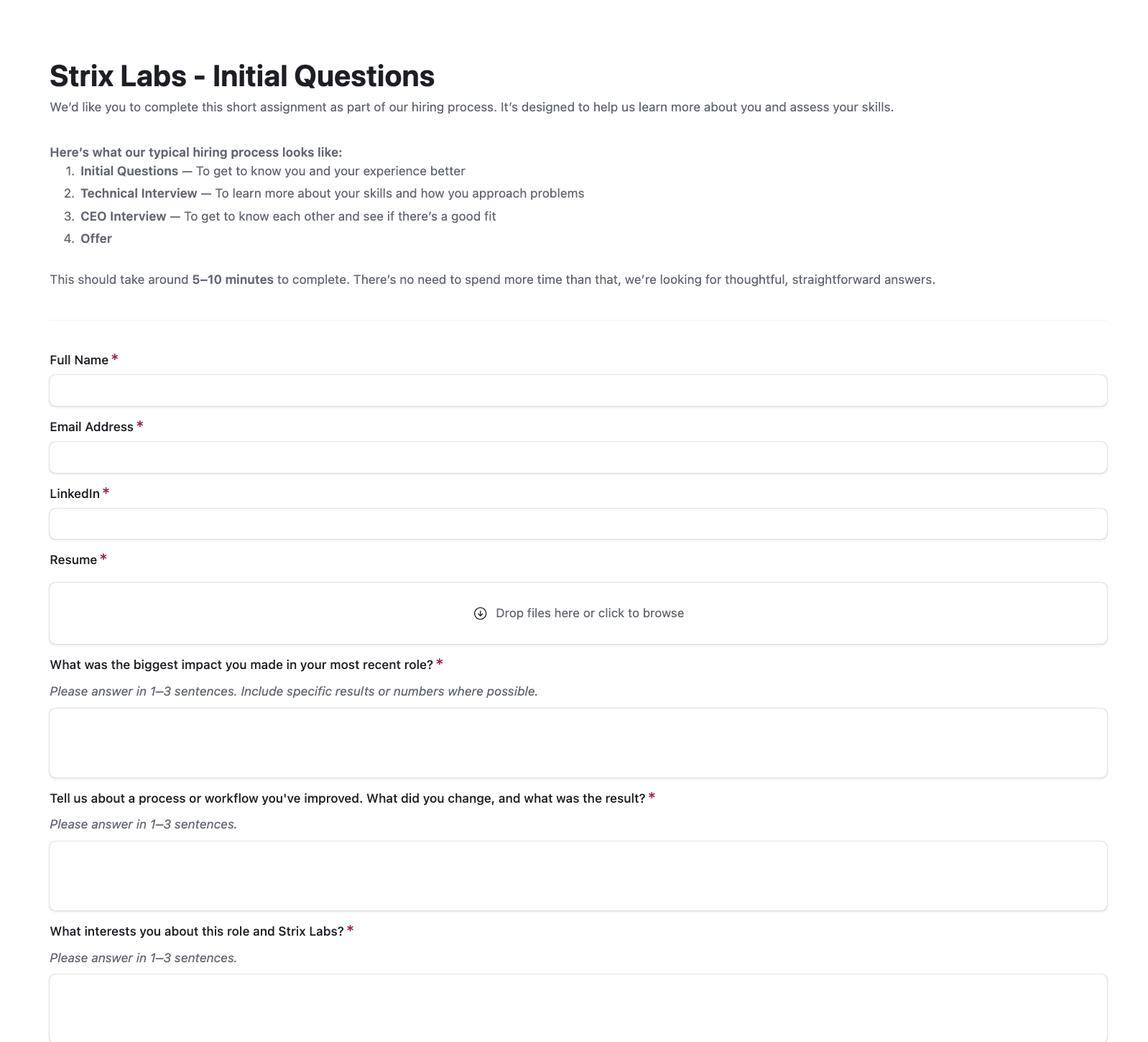
You can explore the application form I created for Strix Labs using this link. The form demonstrates how applicant information is collected during the initial screening stage.
To support consistent candidate evaluations, I included structured evaluation criteria for the interview stages. Rather than relying entirely on interview notes or personal impressions, the hiring team can use defined criteria to assess applicants. This makes it easier to review and compare evaluations, particularly when multiple people are involved in the hiring process.
I also created separate views to identify applicants at different stages, including those who have been rejected and need to receive an update.
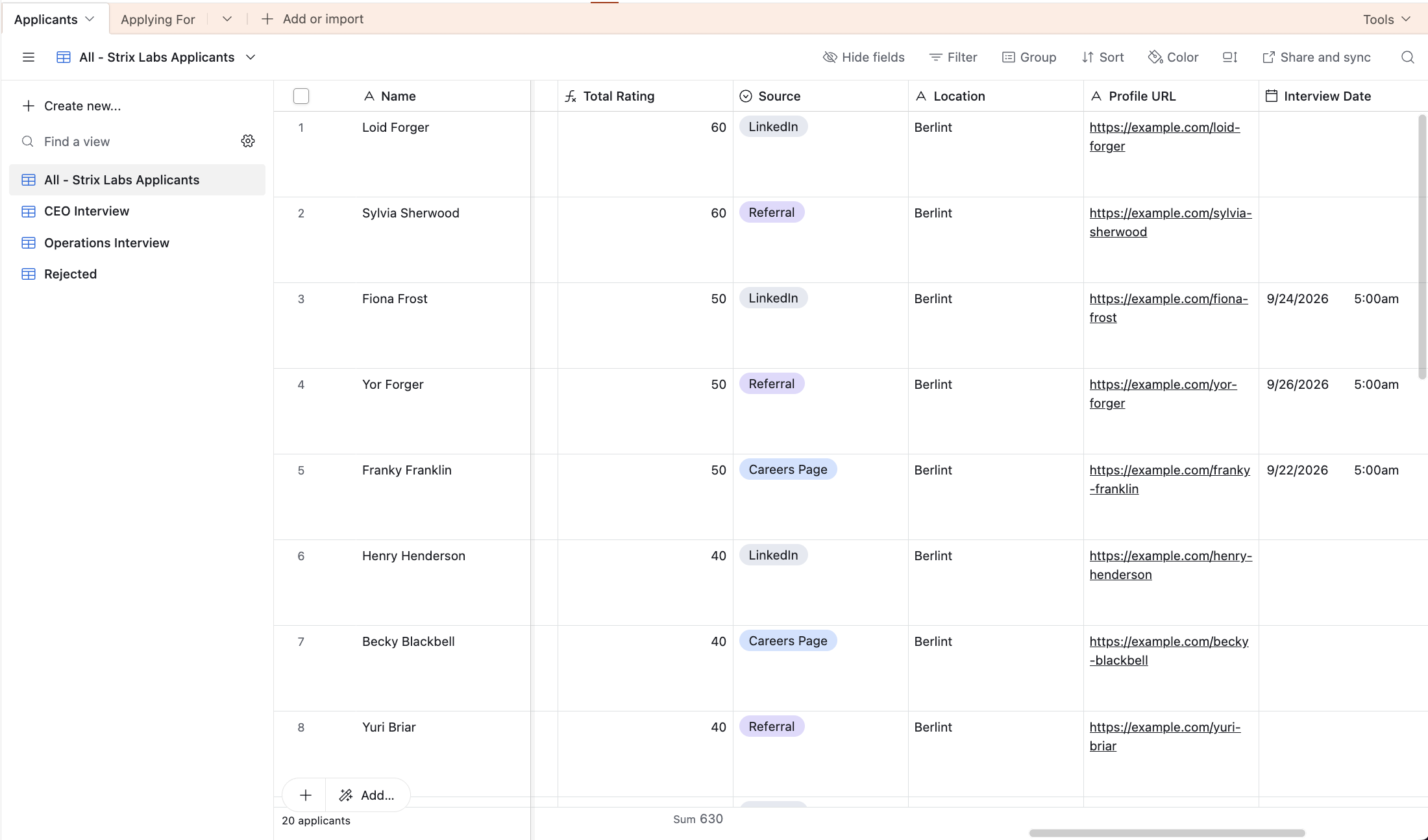
You can view the Airtable database here.
Automating Interview Scheduling
Once an applicant passes the initial screening, the next step is scheduling an interview. Traditionally, this may involve exchanging emails to find a suitable time, sending a calendar invitation, and manually updating the applicant’s record.
To simplify this process, I created an interview booking page in Calendly and connected it to Google Calendar. Candidates can select an available time slot, provide their details, and book their interview. I also added two questions to the booking form to gather additional information about their interest in the role and anything else they would like the interviewer to know.
However, scheduling the interview is only part of the process. The applicant’s record also needs to reflect that an interview has been booked. To address this, I used Zapier to connect Calendly with Airtable.
When a candidate books an interview, Zapier receives the booking information, finds the corresponding applicant record using their email address, and updates the interview details in Airtable. This eliminates the need to manually enter the booking information into the applicant database each time an interview is scheduled.
To test the automation, I used a fictional applicant named Franky Franklin. I booked an interview through Calendly and verified that the corresponding Airtable record was updated with the scheduled interview information. This confirmed that booking information could move between applications without requiring manual data entry.
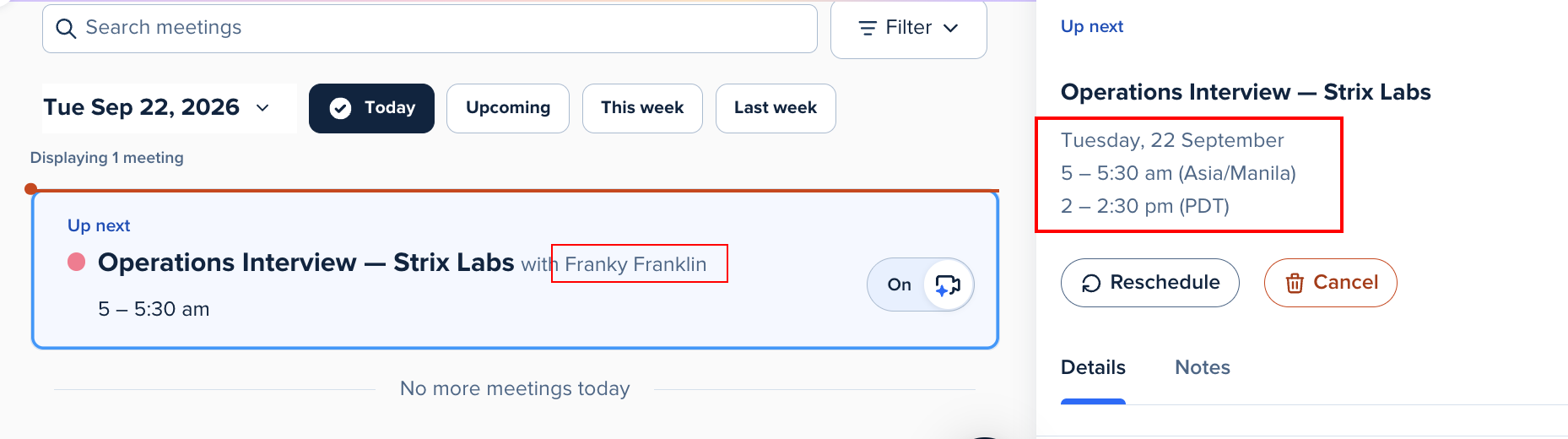
(Screenshot from Calendly showing the interview details)
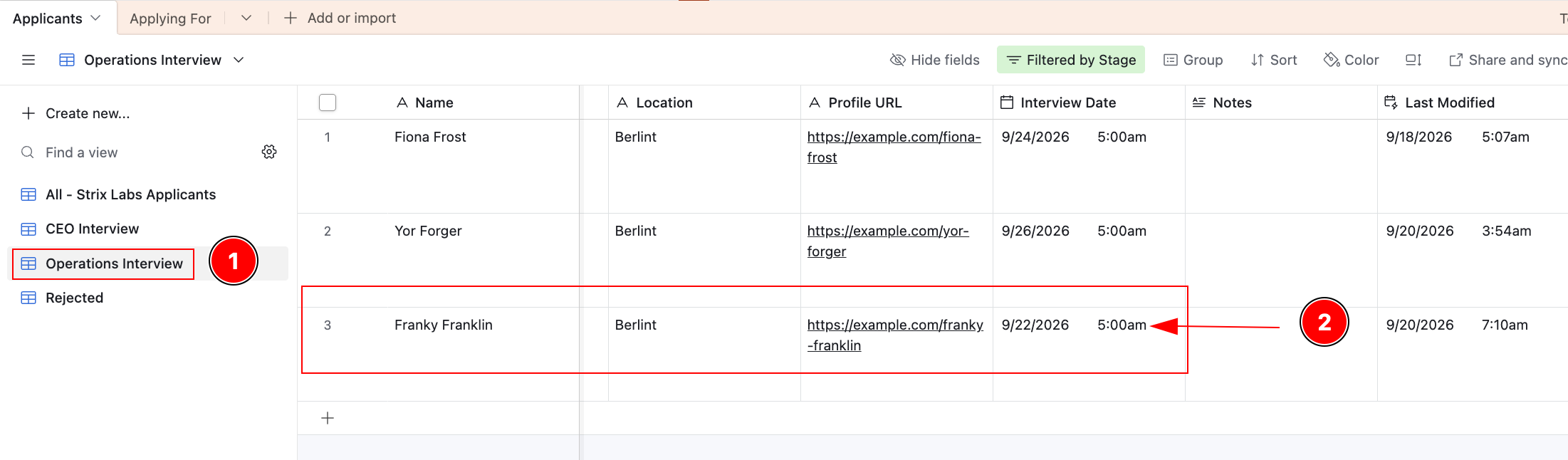
(Screenshot from Airtable showing that the interview schedule was synced)
Tracking Recruitment in Google Sheets
Airtable serves as the main applicant database, but I also wanted a separate location to review recruitment activity and generate reports. For this purpose, I used Google Sheets.
I connected Airtable to Google Sheets through Zapier so that applicant information could be synchronized automatically. This reduces the need to maintain the same information manually across both applications and provides a separate reporting view of recruitment activity.

(Screenshot showing that the interview that was synced in Airtable was also synced in Google Sheets)
The spreadsheet can be used to review applicant information, monitor how many candidates are at each stage of the hiring process, and prepare recruitment updates. Having a separate reporting view can also be useful when sharing recruitment information with team members who do not require access to the entire applicant database.
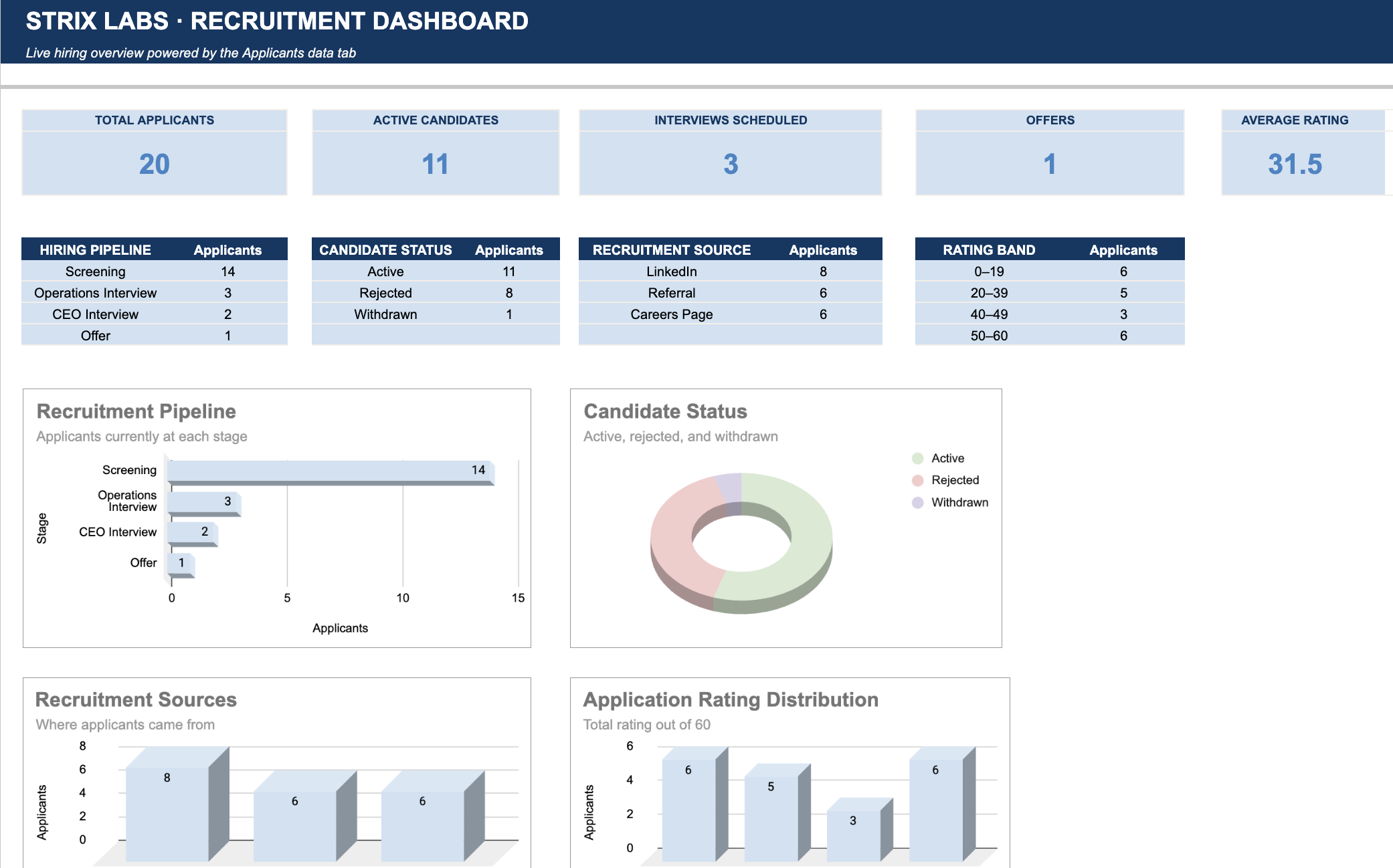
You can view the Google Sheets Dashboard here.
Airtable remains the central location for managing applicants, while Google Sheets provides an additional layer for tracking and reporting.
Sending Personalized Emails With Google Apps Script
Interview scheduling is not the only repetitive part of recruitment. Candidate communication can also take time, particularly when several applicants need to receive the same type of update.
For example, after reviewing applications, a recruiter may need to send rejection emails to multiple candidates. Writing and sending each email individually becomes repetitive when the message is essentially the same.
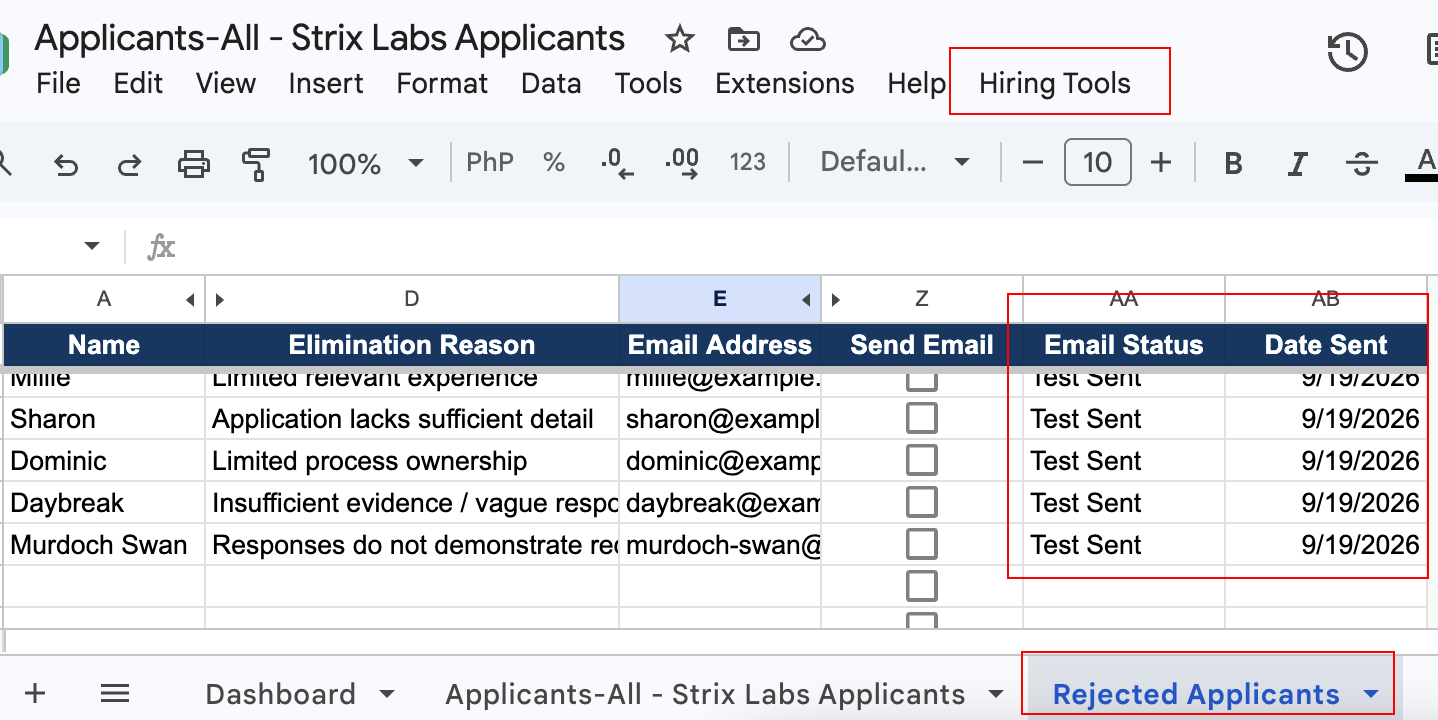
To simplify this process, I used Google Sheets and Google Apps Script to create a mail merge. The spreadsheet contains the recipients’ information, while the script uses that information to generate personalized emails.
Instead of manually copying names and email addresses into individual messages, the script can process multiple recipients in a single run. This approach is particularly useful for standardized communication, such as application acknowledgments or rejection emails.
Not every candidate interaction should be automated. Some situations require a personal response, particularly when a candidate has already invested significant time in the interview process. The purpose of this automation is to reduce repetitive work while maintaining appropriate human involvement in candidate communication.
What I Learned
One of the key lessons from this project is that automation does not necessarily mean automating every part of a process. It involves identifying repetitive tasks, determining which activities require human judgment, and finding opportunities to connect existing tools to make a workflow more efficient.
Building the automation itself is only one part of the process. It is also important to consider how information moves between applications, how records are matched, what happens when information is missing, and whether the resulting workflow is useful to the people managing it.
An automation should reduce unnecessary work rather than introduce additional complexity. While this demonstration uses multiple applications, a company with an existing ATS or a more advanced Airtable setup may not need all of them. The appropriate solution depends on the company’s existing tools, recruitment volume, and operational requirements.
Final Thoughts
This project started with a simple question: How can I reduce the repetitive work involved in managing recruitment? The result is a hiring pipeline that combines applicant tracking, interview scheduling, recruitment reporting, and candidate communication.
This is a demonstration built with fictional applicants rather than a production recruitment system. A real implementation would require additional testing, appropriate access controls, and adjustments based on the company’s actual hiring process.
The underlying approach can also be applied to other areas of operations. By identifying repetitive tasks, understanding the existing process, and connecting the right tools, it is possible to create workflows that reduce manual work and allow teams to focus on activities that require their attention.
An entirely new platform is not always necessary to improve an existing process.